RV Home Automation
I have always been interested in Home Automation and in fact when we still owned a sticks and bricks home I had created a fairly sophisticated system there incorporating power monitoring, light control, climate, landscape watering, and security. Soon after we started full timing I had a discussion with a friend about a system that could allow you to remotely monitor temperature inside the RV for piece of mind when pets are left inside during day trips. That discussion started me thinking about how I could do the same thing myself and what other features I might want to include. The lockdowns for the COVID-19 pandemic gave me time to start looking into all this.
As I thought about it, I had planned to create a single controller to incorporate all the features. Then while visiting my son for Christmas we got into a discussion about the automation system that came with his home and integration of WiFi switches into it. I wondered why WiFi wasn’t used more often since almost everyone has it these days and so I began to investigate. The weak point for me was the fact that all the WiFI products I found use cloud connections for control. I had two issues with that. First, I consider it a security issue to have everything controlled and monitored by someone else. Second, unlike a home with cheap unlimited internet capability we mostly utilize cellular data and it is somewhat limited and at times unreliable.
Then I found a product by a company called Sonoff. By default they also use a cloud connection for control but there are open source firmware alternatives that allow local control without a cloud connection. After research, I chose the open source firmware called Tasmota. As you will soon see, Sonoff and Tasmota allowed me to quickly and efficiently implement several of my desired features.
Before I cover the implementation details here is a list of the features I initially wanted to implement:
- No cloud control, all features must be able to function locally.
- For remote monitoring, minimize the data sent over the internet.
- Web Dashboard capability.
- Monitor the front bay temperature and control a heater to keep the battery temperature above freezing.
- Monitor up to 2 temperature sensors in the basement and control the heater to prevent the tanks and pipes from freezing in cold weather.
- Incoming AC voltage monitoring.
- Monitor battery voltage, current, state of charge, etc. and if possible the inverter and solar controller parameters.
- Indoor temperature (up to 2 sensors).
You will see in the details that follow that all of the initial goals have been met or in many cases exceeded. I will continue with details of each component from the least technical to the most technical as most people probably won’t get to the bottom of the post. 🙂
Dashboard
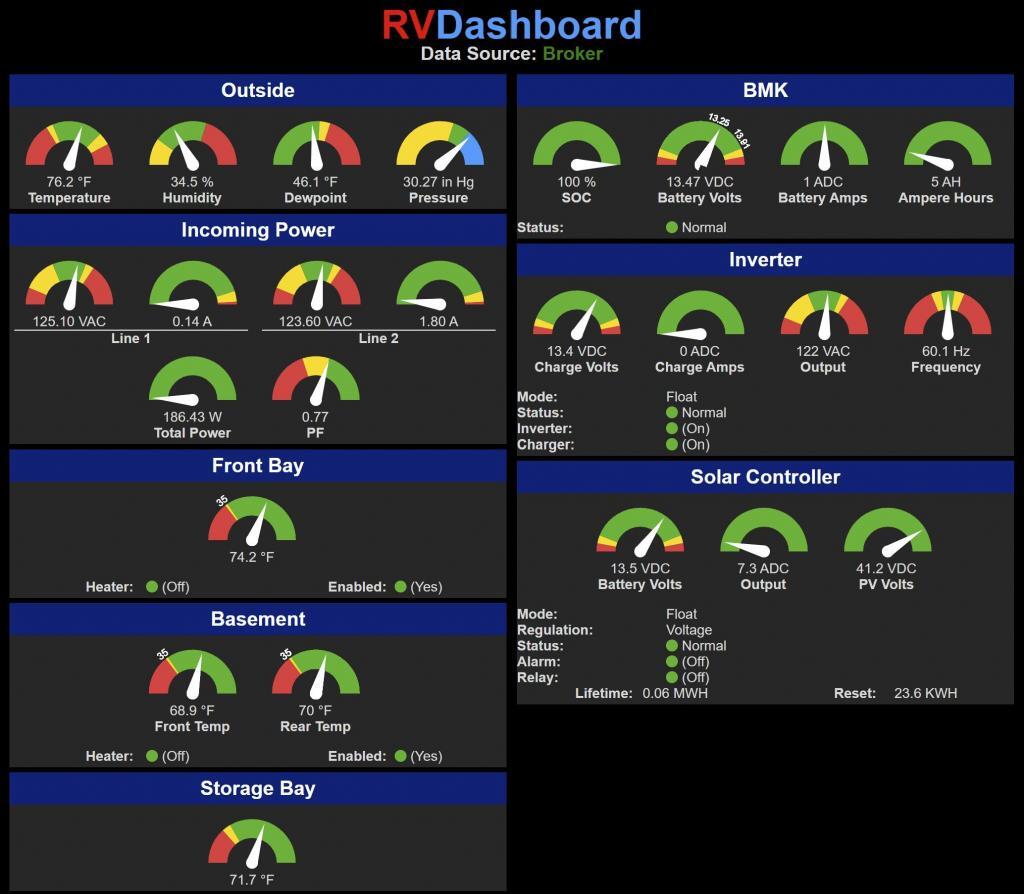
The dashboard is a web page accessible from anywhere in the world. It is hosted by a commercial web hosting service which is also where this blog site is hosted. You may notice at the top of the page a field called Data Source. Data for the page can be supplied either by the local MQTT broker (more on this later) or from data kept on the remote host server. Broker data is updated in real time but you must be on the local network of the RV to connect to the broker. Server data is updated once a minute but only while the dashboard is being displayed and the user viewing it is not local. This helps keep internet usage to and from the RV to a minimum.
Each of the devices used around the RV for automation communicate using a protocol called MQTT and that data is accumulated and stored by the Mosquitto MQTT server on a local computer within the RV. This allows the remote devices to minimize communication overhead while providing the capability for multiple consumers to obtain the data. There is plenty of information online about the benefits of using MQTT and how to set up a server so I won’t go into this further here.
There is no ability to control any settings from the dashboard as it is intentionally read only. This is by design for security reasons. There really isn’t any need to be able to change settings remotely anyway and everything can be configured using other methods locally.
Analog values are displayed using gauges available from https://bernii.github.io/gauge.js/. There are a few text only fields and the remaining are “LED” type fields. They are green under normal circumstances and flash red for abnormal circumstances. With the flashing Leds and color coded gauges, the status of the RV can be quickly checked to determine if everything is in a normal range.
Front Bay Control
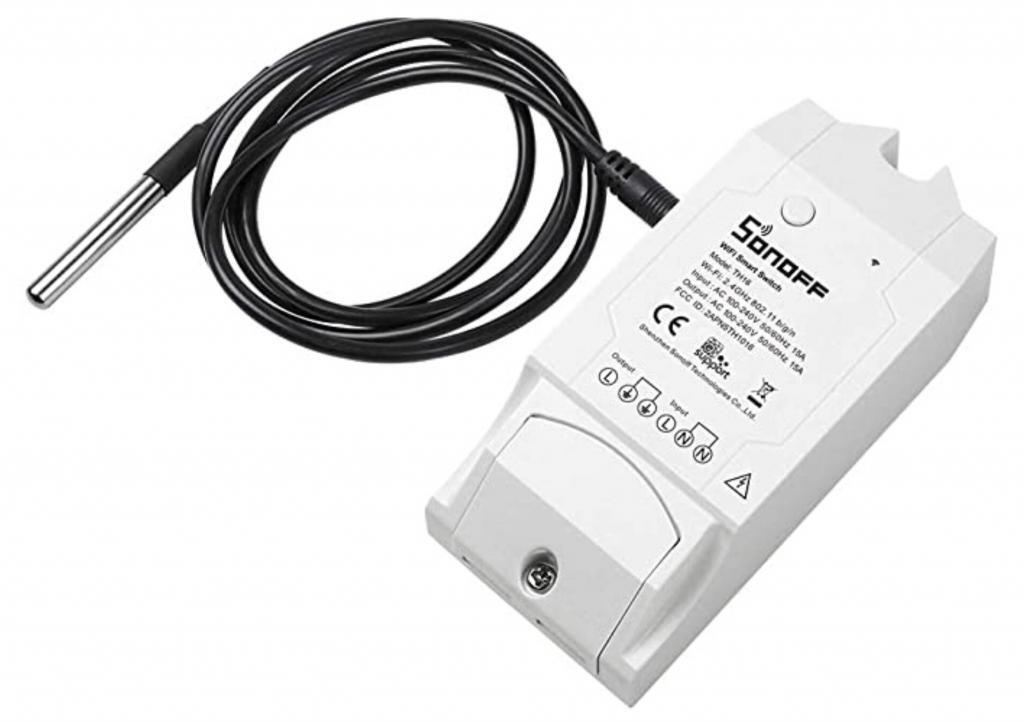
One of the first things I implemented was a heater in the front bay to keep temperatures there above freezing. Our Lithium batteries cannot charge when the temperature is below freezing. For the temperature control, I bought an off the shelf Sonoff TH16 for about $20 from Amazon.
The default firmware will use a cloud based connection for control so I re-flashed the firmware with Tasmota (https://tasmota.github.io/). This procedure involves adding a header to the circuit board and using a USB to TTL converter to flash from a computer. The exact procedure is beyond the scope of this post but is fully documented on the Tasmota web site.
Tasmota allows you to create internal rules to perform actions based on events such as temperature getting too low. For the front bay heat I originally used a set of temperature control rules from a “cookbook” article on the Tasmota site (At the time of this post, there is a thermostat capability that can be built into the firmware). Once I moved on the the basement controller, I used the same rule in both places to simplify future maintenance. See the Basement Control section for more information.
The heater for the front bay is simply an old style (non-LED) bulb for safety. At the time of this post, it has not been needed even with below freezing temperatures but it’s nice to know it is there for the day it is needed.
Basement Control
c
AC Power Monitor
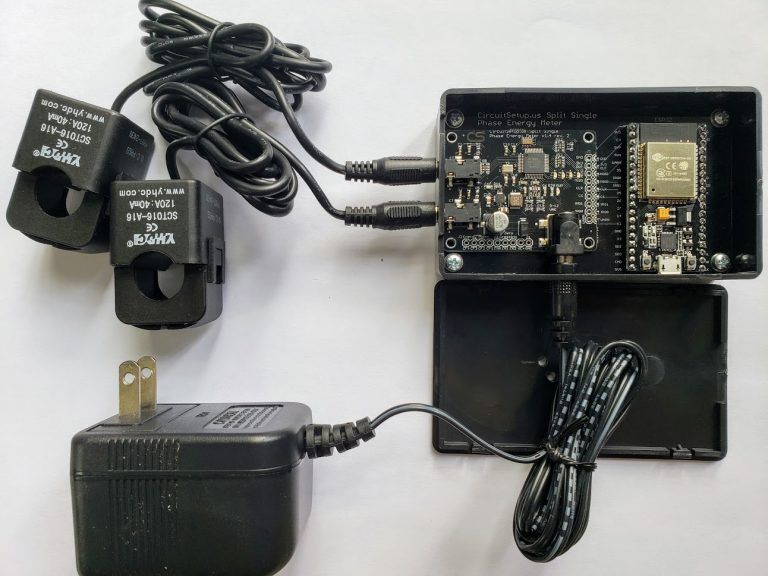
As I started researching how to measure the voltage of the two voltage legs coming into the RV from the RV park pedestal, I came across Circuit Setup (https://circuitsetup.us/). Their Split Single Phase Real Time Whole House Energy Meter Kit can be purchased for less than $100 including 2 current probes and 2 9V power transformers. This allows monitoring both legs on a 50 Amp RV for both current and voltage. Power usage as well as power factor is calculated by the firmware of the device.
Like the temperature controllers, the energy meter can communicate all the electrical measurements to the MQTT server so that other devices can display or make use of the data. That information is used for the data displayed by the dashboard.
Unlike the Sonoff devices, the firmware for this should work off the shelf. Of course, I couldn’t just do that however. The mode that allows a second voltage input only has one calibration value for both inputs. I found a difference of several volts for each leg once calibrated which isn’t a lot but I wanted better accuracy. I added a second calibration value so that each leg could be calibrated separately giving much better results.
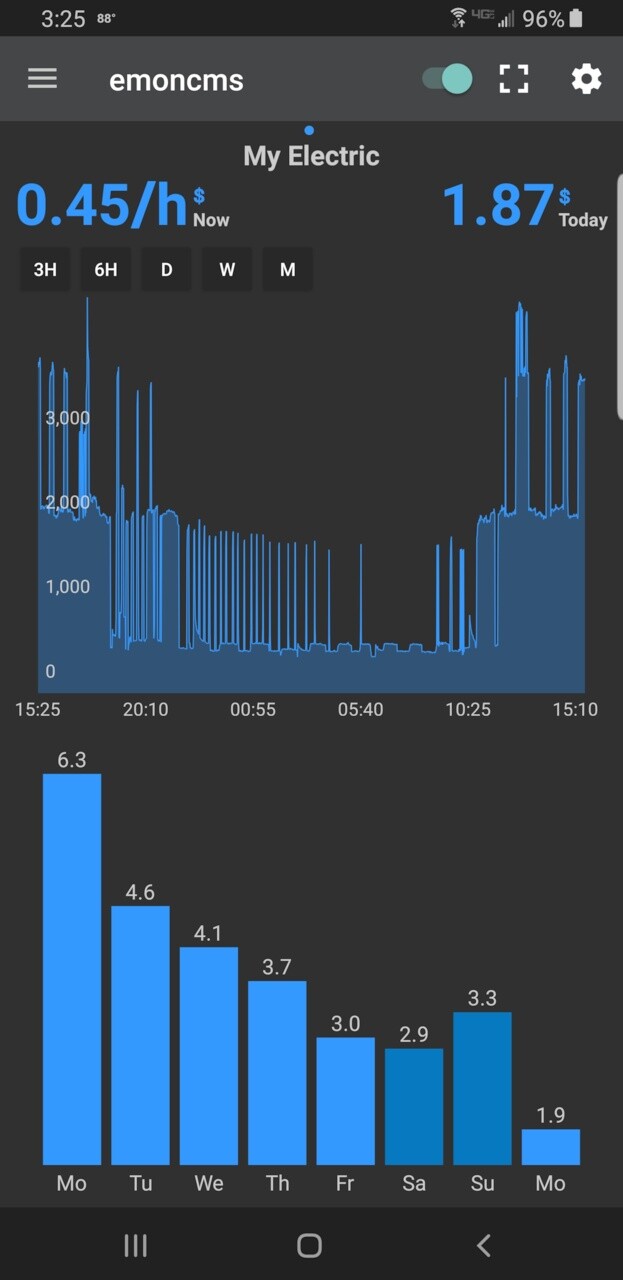
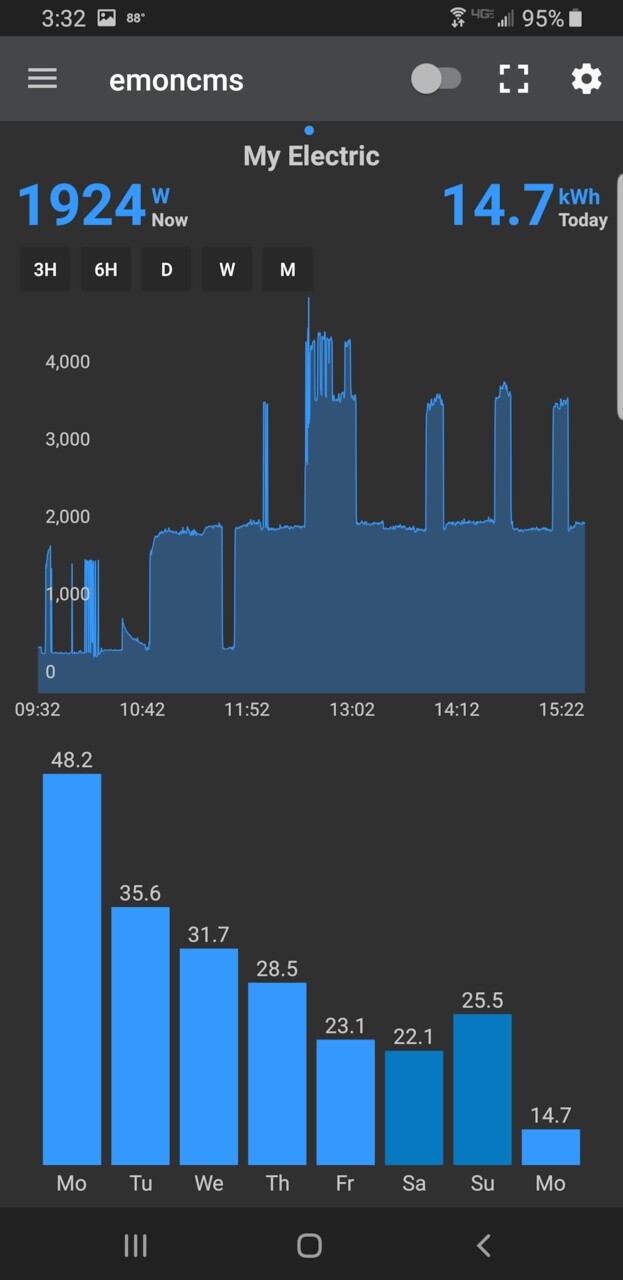
Circuit Setup also includes free software called EmonCMS which can be used to track energy usage over time. It is possible to use this via a cloud based implementation but I chose a local installation instead. This is not well supported but if you have a linux server and decent skills you can figure out how to set it up using their installation scripts as a guide. Unfortunately the installation scripts are not 100% right (or weren’t for my installation) so I had to manually figure it all out. Once working, you can get nice graphs of consumption over various time periods using either a web browser or an Android or IOS application.
Inverter/Solar Controller Monitor
e
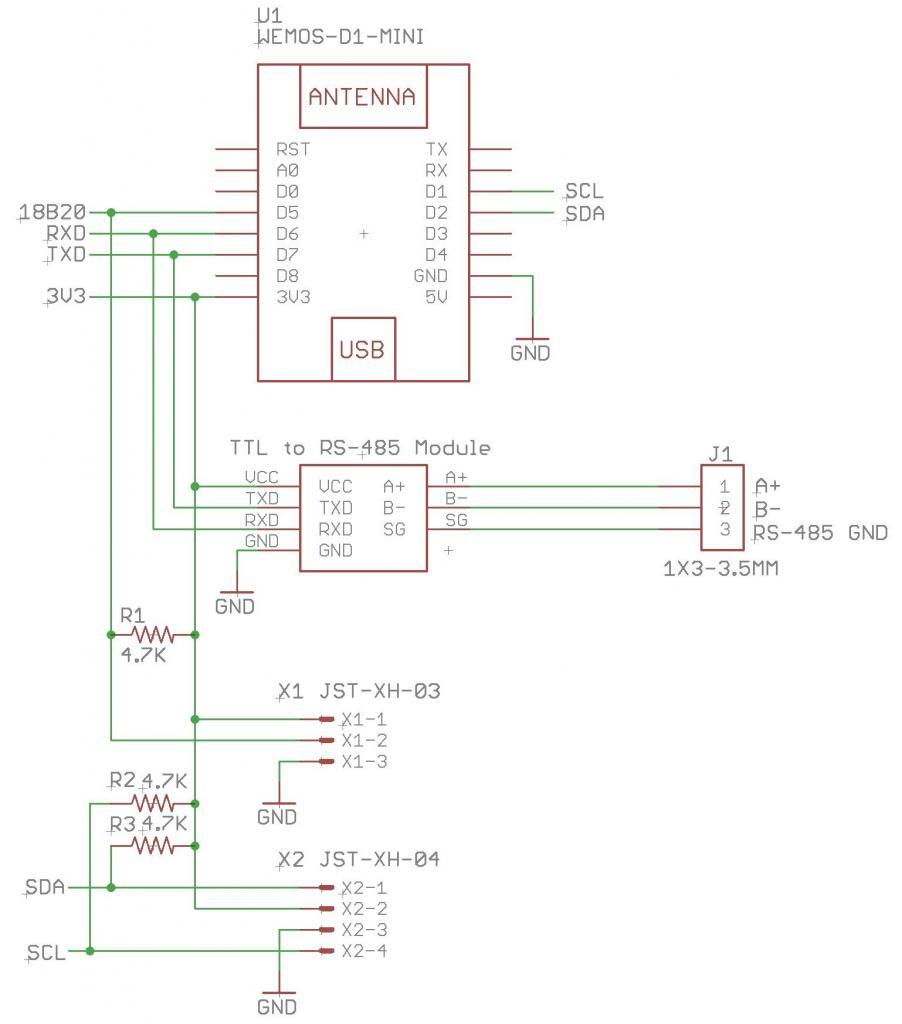
d
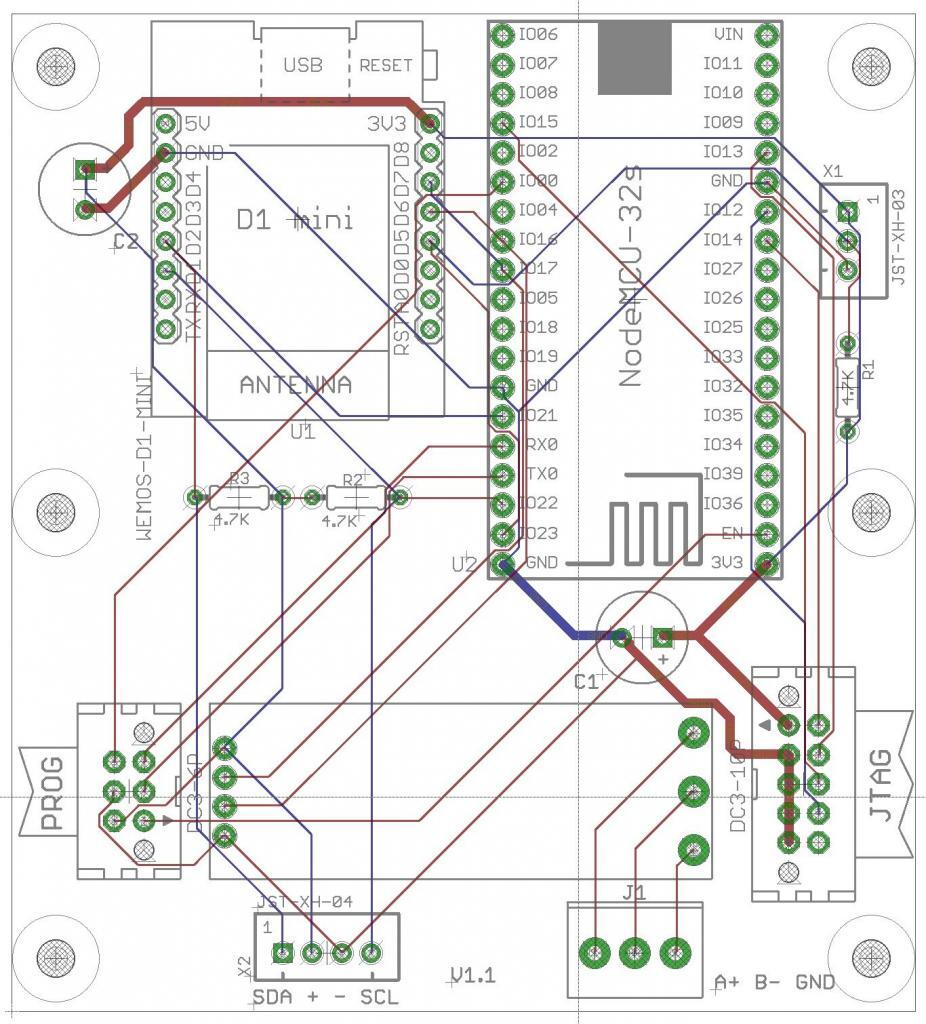
Indoor Temperature Sensors
Even though this was one of the main requirements for this project I have not yet implemented the feature. Using the Magnum Monitor hardware I have a temporary solution but ultimately I want to build something, likely battery powered, that looks good which can be permanently used.
Future Goals
In addition to the indoor temperature sensors, there are two more sensors I’d like to implement.
We have two Mopeka Propane level sensors that use Bluetooth for communication. I’d like to be able to intercept those communications and be able to incorporate propane levels in the dashboard. I have the ability to see the communication but so far I haven’t yet figured out how to decode the information.
I’d also like to add the ability to intercept the black and grey tank levels from our See Level II system. I believe I have information which should help to do that but it will have to be in a future project.